What is Spotflow?
Introducing the observability platform for embedded devices
Spotflow is an observability platform designed specifically for embedded devices. With Spotflow, you can see what is happening across your whole device fleet, detect problems early, investigate issues, and deploy firmware updates over-the-air.
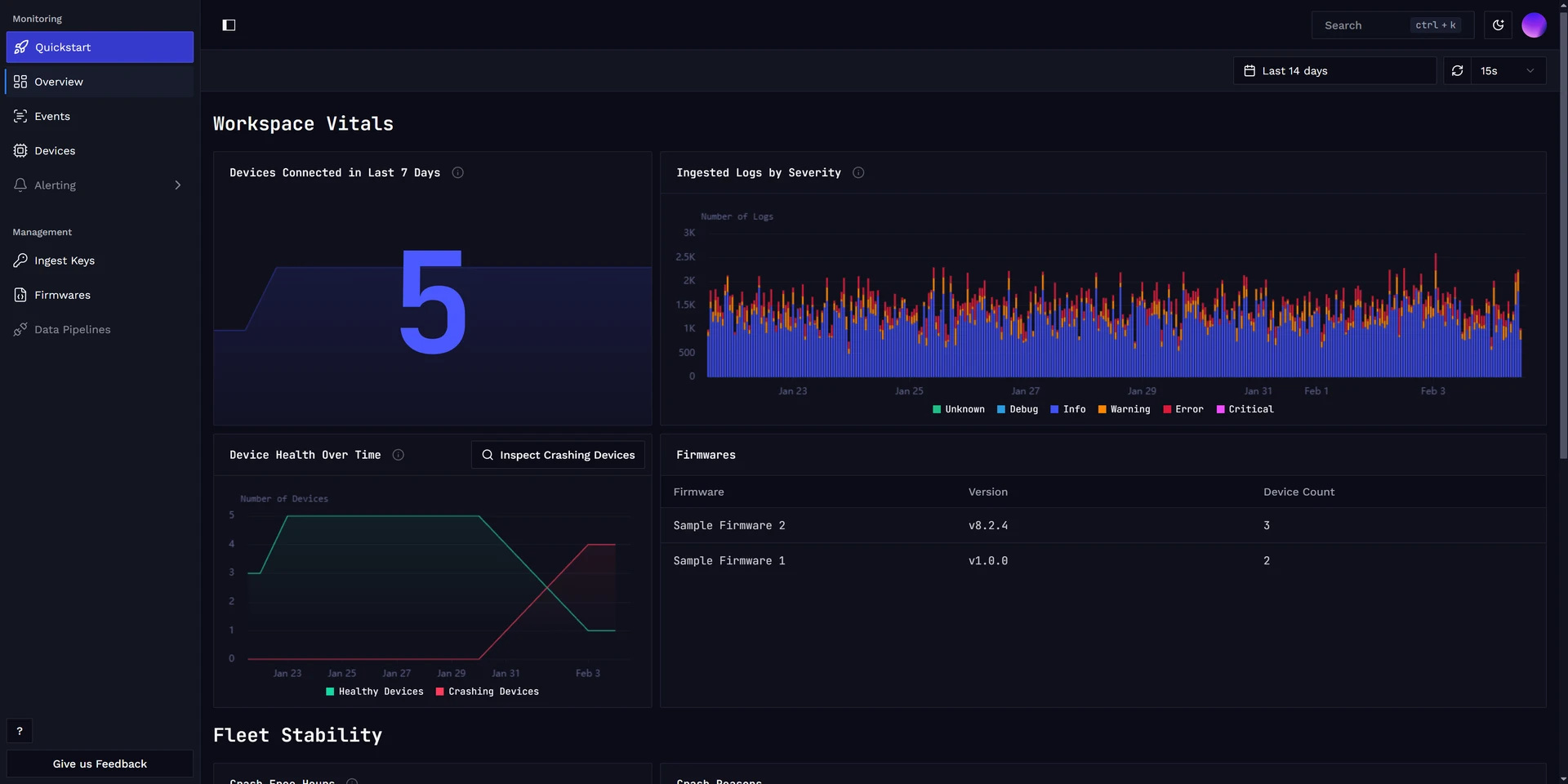
Spotflow gives you dashboards for a clear view of your devices. It tracks important device metrics out of the box, and you can add custom metrics directly in your firmware for the parts of your product that matter most. You can also set up alerts so you know when something goes wrong.
When you need to investigate a problem, Spotflow lets you look at individual devices in detail. Our SDK collects logs, metrics, and crash dumps out of the box, helping you find the root cause faster.
We offer first-class integration for Zephyr RTOS, ESP-IDF, Nordic nRF Connect SDK, and Embedded Linux. Other platforms can be integrated easily using our MQTT-based protocol.
Our goal is to provide an all-in-one observability solution for embedded devices. Visit our roadmap to see what we are working on next.
Components
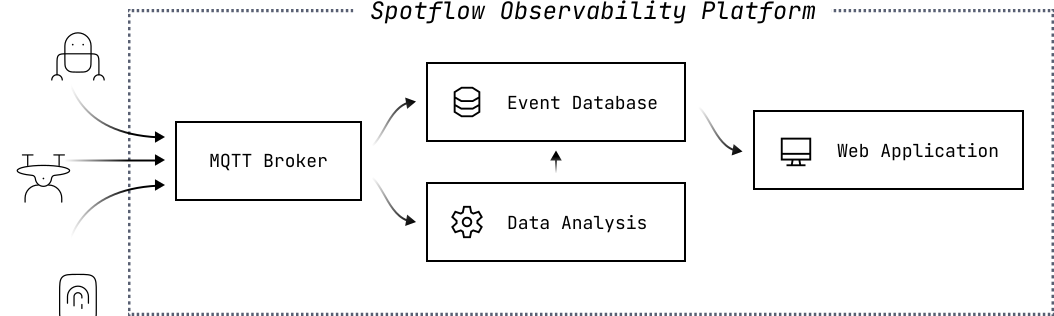
Spotflow consists of two main components:
- Device Module: A lightweight library or daemon that you integrate into your device. It automatically collects metrics, logs, and crash reports, then sends them to Spotflow’s telemetry backend. On supported platforms, it can also perform over-the-air firmware updates when requested.
- Cloud Platform: A cloud service that communicates with devices over MQTT and provides a web interface for monitoring, analyzing, and managing your device fleet.
- Telemetry Storage and Querying: A storage and query system built on a highly optimized columnar data store. It lets you search metrics, logs, and crash reports by content and metadata, including device ID, timestamp, firmware version, and more.
- FOTA Management: A firmware update management system for deploying updates to specific groups of devices. It provides clear visibility into rollout progress and lets you roll back updates if something goes wrong.
- Alerting System: A rules-based system that monitors incoming metrics and sends email notifications when user-defined conditions are met, such as threshold breaches or rapid changes in reported values.
- Crash Analyzer: A combination of detailed GDB-based analysis and a purpose-built AI agent. It lets you inspect stack traces, registers, and static and global variables for each crash report. The AI agent analyzes crashes automatically and provides root-cause insights with suggestions for fixing the issue.
Why choose Spotflow?
We are building Spotflow with the goal of minimal friction for setting up while providing deep insights into your embedded devices. To name a few of the key features:
- Minimal setup: Integrating your device with Spotflow requires just a few lines of code. Then our device module will automatically collect all the necessary telemetry.
- Great visibility into device fleet: Our web interface provides a clear overview of your entire device fleet, including stability metrics, firmware versions, and more.
- Works when internet connection is not available: Our device module buffers logs within volatile memory, ensuring that logs are collected even when the device is offline. Once the device is back online, it will automatically send the buffered logs to Spotflow.
- Optimized transport format: We use a custom transport format based on CBOR. This format is designed to have minimal overhead, ensuring that logs are transmitted efficiently over the network.
- Fine-tunable to work on resource-constrained devices: You can configure the sizes of the log buffers, allowing you to optimize memory usage based on your device's capabilities.
- Rich querying capabilities: Our web interface provides powerful querying, allowing you to filter and search logs based on their contents and metadata like device id, timestamp, and more.
- Quick insights into firmware crashes: Our AI agent automatically analyzes each crash report to provide you with a root cause analysis and suggestions for fixing the issue.
Supported platforms

Spotflow currently aims to provide best-in-class experience for Zephyr RTOS, Nordic nRF Connect SDK, ESP-IDF, and Embedded Linux. With these platforms, you can integrate a lightweight library into your firmware or install a daemon on your device. Then you can use your platform's standard logging APIs to log messages, which will be automatically collected and sent to Spotflow.
Other devices can be integrated using the MQTT protocol. This approach provides the biggest flexibility, allowing you to send logs from any device that supports MQTT.
Learn how to connect your device
See the quickstart guides below to learn how to connect your specific device to Spotflow.
Quickstart for Zephyr on QEMU
No device at hand? Run real Zephyr firmware on an emulated board with one Docker command.
Quickstart for Zephyr devices
Learn how to integrate your device running Zephyr RTOS with Spotflow.
Quickstart for nRF Connect SDK
Learn how to integrate your Nordic device running nRF Connect SDK with Spotflow.
Quickstart for ESP-IDF
Learn how to integrate your ESP-IDF device with Spotflow.
Quickstart for Embedded Linux
Learn how to integrate your Embedded Linux device with Spotflow.
Quickstart for the MQTT integration
Learn how to integrate any device with Spotflow using MQTT.