Metrics with Zephyr
Enable system and custom metric collection on devices running Zephyr RTOS and analyze ingested metrics in Spotflow dashboards.
This guide explains how to gather metrics from devices running Zephyr RTOS using the Spotflow device module. You can collect system metrics automatically and report custom application metrics using the same SDK.
Prerequisites
Before you start integrating your device with Spotflow, make sure you:
- have development environment with Zephyr 3.7, 4.1, 4.2, 4.3, or 4.4,
- have established a connection to the internet from the device.
When creating a new west workspace, make sure to use a supported Zephyr version, for example, using west init --mr v4.3.0.
By default, west init checks out the main branch, which may contain changes breaking the build.
Alternatively, you can follow the Quickstart: Zephyr Integration Guide to integrate Spotflow using sample application, instead of adding the spotflow module to an existing project.
Install Spotflow Device Module
Add the spotflow module as a west dependency to your west.yml file.
manifest:
    projects:
    - name: spotflow
        revision: main
        path: modules/lib/spotflow
        url: https://github.com/spotflow-io/device-sdk
Then, install the west dependencies using the following command:
west updateEnable metrics in Kconfig
Add the following options to your prj.conf:
CONFIG_SPOTFLOW=y # Enable Spotflow Module
CONFIG_SPOTFLOW_DEVICE_ID="zephyr-device-001" # Set unique identifier of your device
CONFIG_SPOTFLOW_INGEST_KEY="{your-ingest-key}" # Set your Spotflow ingest key

# Enable Spotflow metrics collection
CONFIG_SPOTFLOW_METRICS=y
Enable system metrics auto-collection
To collect system telemetry automatically, enable:
CONFIG_SPOTFLOW_METRICS_SYSTEM=yThe following system metrics are collected:
| Metric | How it is collected |
|---|---|
Heap Free Bytes (heap_free_bytes) | Sampled with sys_heap_runtime_stats_get() from _system_heap and reported from free_bytes. |
Heap Allocated Bytes (heap_allocated_bytes) | Sampled with sys_heap_runtime_stats_get() from _system_heap and reported from allocated_bytes. |
CPU Utilization Percent (cpu_utilization_percent) | Sampled with cpu_load_get(true) and converted from per-mille to percent. |
Thread Stack Free Bytes (thread_stack_free_bytes) | Sampled per tracked thread with k_thread_stack_space_get(). |
Thread Stack Used Percent (thread_stack_used_percent) | Derived per tracked thread from thread->stack_info.size and k_thread_stack_space_get(). |
Network TX Bytes (network_tx_bytes) | Sampled per active interface via net_if_foreach(...) from iface->stats.bytes.sent. |
Network RX Bytes (network_rx_bytes) | Sampled per active interface via net_if_foreach(...) from iface->stats.bytes.received. |
MQTT Connection State (connection_mqtt_connected) | Event-driven and reported when MQTT state changes through spotflow_metrics_system_report_connection_state(bool). |
Boot Reset Cause (boot_reset) | Reported once on boot using hwinfo_get_reset_cause(), then reset cause is cleared with hwinfo_clear_reset_cause(). |
By default, stack metrics are collected for all threads (CONFIG_SPOTFLOW_METRICS_SYSTEM_STACK_ALL_THREADS=y).
If you need to limit this, disable that option and register only selected threads with spotflow_metrics_system_enable_thread_stack(...).
Check implementation details in the SDK system metrics folder.
Analyze system metrics in dashboards
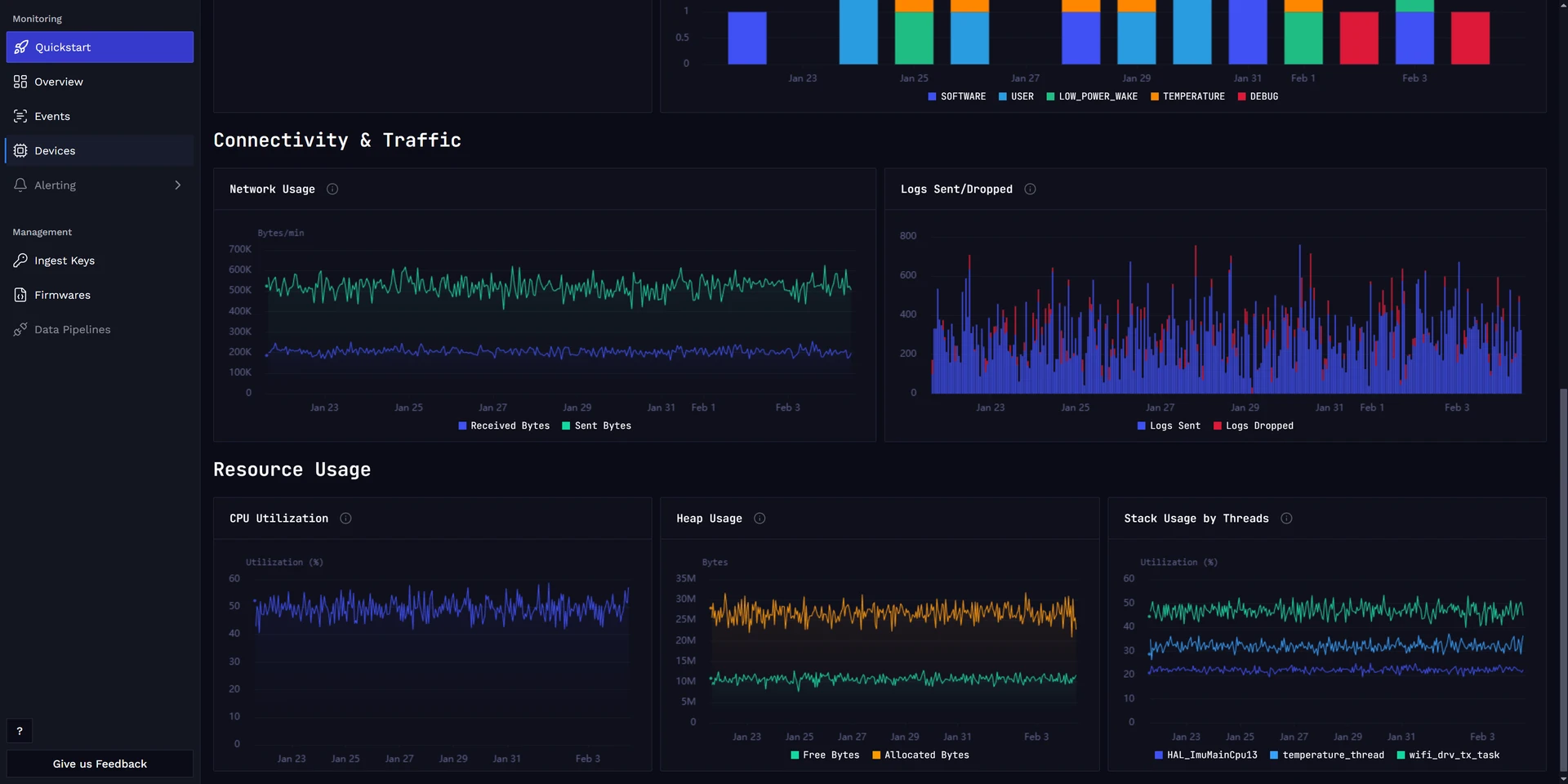
After enabling system metrics, open the Device Dashboard to inspect device vitals, resource usage, and connectivity trends:
Report custom metrics
Custom metrics let you track application-specific values such as sensor readings, request latencies, or business counters. The SDK handles aggregation, encoding, and transmission to Spotflow automatically.
CONFIG_SPOTFLOW_METRICS_SYSTEM=y is not required for custom metrics. You can use custom metrics independently or alongside system metrics.
Include the metrics header
Include the metrics API header in your application source file:
#include "metrics/spotflow_metrics_backend.h"This header provides functions for registering and reporting metrics. It transitively includes the type definitions and registration API.
Register metrics
Before reporting values, each metric must be registered with a name and an aggregation interval. Registration returns a handle that is used for all subsequent reports.
Metrics can be either integer (int64_t) or float (float), and optionally support labels for dimensional breakdowns.
Label-less metrics
A label-less metric tracks a single time series:
static struct spotflow_metric_int *counter_metric;
static struct spotflow_metric_float *temperature_metric;

int rc;

/* Integer metric aggregated over 1 minute */
rc = spotflow_register_metric_int(
    "app_counter",
    SPOTFLOW_AGG_INTERVAL_1MIN,
    &counter_metric);

/* Float metric with no aggregation (each value sent immediately) */
rc = spotflow_register_metric_float(
    "temperature_celsius",
    SPOTFLOW_AGG_INTERVAL_NONE,
    &temperature_metric);
Labeled metrics
A labeled metric tracks multiple time series distinguished by label key-value pairs.
At registration, specify the maximum number of unique label combinations (max_timeseries) and the maximum number of labels per report (max_labels):
static struct spotflow_metric_float *lock_duration_metric;

rc = spotflow_register_metric_float_with_labels(
    "lock_operation_duration_ms",
    SPOTFLOW_AGG_INTERVAL_1MIN,
    6,   /* max_timeseries: e.g. 2 operations x 3 methods */
    2,   /* max_labels */
    &lock_duration_metric);
Each unique combination of label values is tracked as a separate time series with its own aggregation state.
For context that remains constant during a connection, use session metadata labels instead of repeating the labels on every metric report. Labels attached directly to a metric take precedence when they use the same key as a session metadata label.
Aggregation intervals
The aggregation interval controls how long values are accumulated before being sent:
| Constant | Interval | Behavior |
|---|---|---|
SPOTFLOW_AGG_INTERVAL_NONE | No aggregation | Each reported value is sent immediately |
SPOTFLOW_AGG_INTERVAL_1MIN | 1 minute | Values are aggregated into sum, count, min, max |
SPOTFLOW_AGG_INTERVAL_1HOUR | 1 hour | Values are aggregated into sum, count, min, max |
SPOTFLOW_AGG_INTERVAL_1DAY | 1 day | Values are aggregated into sum, count, min, max |
Metric names are normalized before registration: alphanumeric characters are lowercased, dashes, dots, and spaces are converted to underscores, and other characters are removed. For example, "My-Metric.Name" becomes "my_metric_name".
Report metric values
After registration, report values at any time from any thread.
Label-less values
/* Report an integer value */
spotflow_report_metric_int(counter_metric, 42);

/* Report a float value */
spotflow_report_metric_float(temperature_metric, 23.5f);
Labeled values
Attach labels to each report using an array of struct spotflow_label:
struct spotflow_label labels[] = {
    { .key = "operation", .value = "unlock" },
    { .key = "method",    .value = "nfc" }
};

spotflow_report_metric_float_with_labels(
    lock_duration_metric, 120.5f, labels, 2);
Label keys can be up to 15 characters and values up to 31 characters (excluding the null terminator).
Events
For point-in-time occurrences where you only need to record that something happened, use the event API.
An event is equivalent to reporting an integer value of 1 with no aggregation:
static struct spotflow_metric_int *door_opened_metric;

/* Register with no aggregation */
spotflow_register_metric_int(
    "door_opened", SPOTFLOW_AGG_INTERVAL_NONE,
    &door_opened_metric);

/* Report that the event occurred */
spotflow_report_event(door_opened_metric);
Events also support labels:
static struct spotflow_metric_int *error_metric;

spotflow_register_metric_int_with_labels(
    "app_error", SPOTFLOW_AGG_INTERVAL_NONE,
    10,  /* max_timeseries */
    1,   /* max_labels */
    &error_metric);

struct spotflow_label error_labels[] = {
    { .key = "code", .value = "timeout" }
};

spotflow_report_event_with_labels(error_metric, error_labels, 1);
Custom metrics can be visualized in Custom Dashboards.
Analyze custom metrics in dashboards
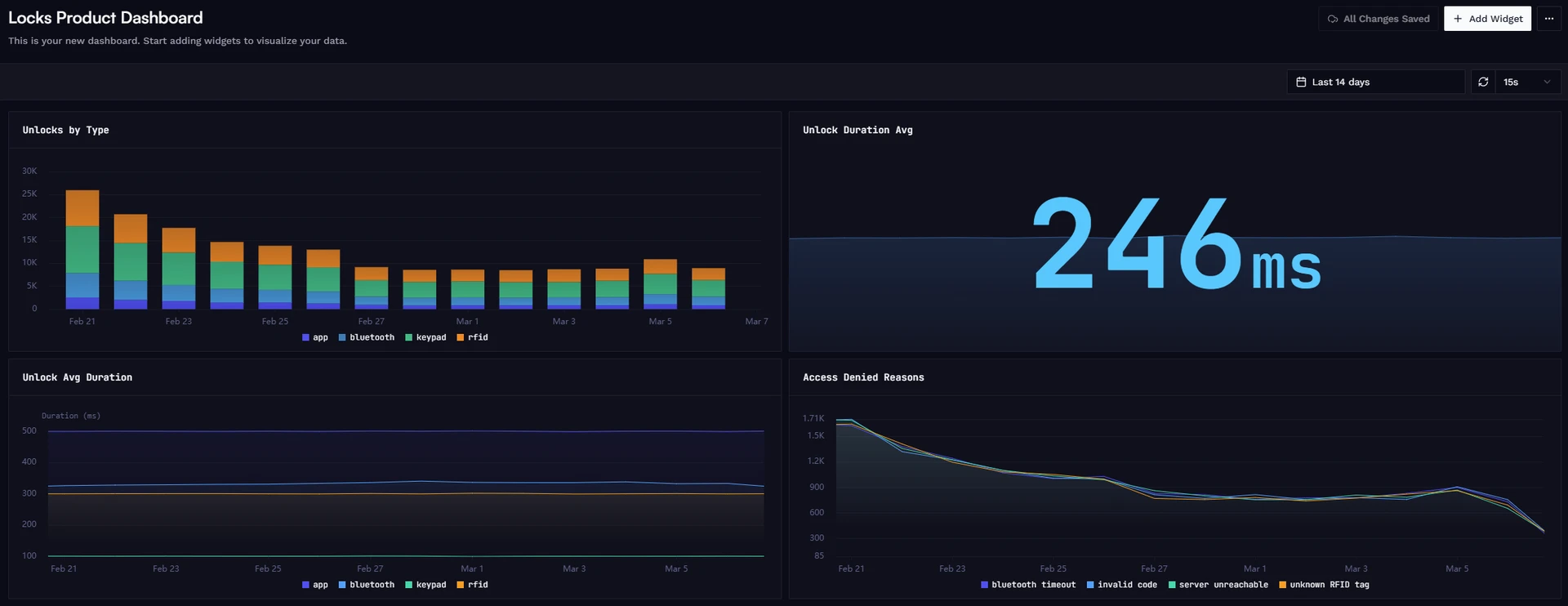
After reporting custom metrics, open Custom Dashboards to visualize and analyze your application-specific data:
(Optional) Tune collection and aggregation
System metrics
Use these options to control sampling cadence and the aggregation window before upload:
CONFIG_SPOTFLOW_METRICS_SYSTEM_COLLECTION_INTERVAL=10
CONFIG_SPOTFLOW_METRICS_SYSTEM_AGGREGATION_INTERVAL=60CONFIG_SPOTFLOW_METRICS_SYSTEM_COLLECTION_INTERVALdefines how often metrics are sampled (in seconds).CONFIG_SPOTFLOW_METRICS_SYSTEM_AGGREGATION_INTERVALdefines how long samples are aggregated before sending.- Aggregation interval supports
0(no aggregation),60(1 minute),3600(1 hour), and86400(1 day). - With aggregation interval
0, each sample is sent immediately. - Lower collection interval gives finer time resolution but increases local processing overhead.
- Higher aggregation interval reduces message frequency and network traffic by combining more samples.
Custom metrics
The following Kconfig options control memory allocation and limits for custom metrics:
CONFIG_SPOTFLOW_METRICS_MAX_REGISTERED=32          # Max number of registered metrics
CONFIG_SPOTFLOW_METRICS_MAX_LABELS_PER_METRIC=4    # Max labels per metric report
CONFIG_SPOTFLOW_METRICS_QUEUE_SIZE=16               # Message queue size before transmission
CONFIG_HEAP_MEM_POOL_ADD_SIZE_SPOTFLOW_METRICS=8192 # Heap memory budget for custom metrics (bytes)CONFIG_SPOTFLOW_METRICS_MAX_REGISTEREDlimits how many metrics can be registered simultaneously (both system and custom metrics share this pool).CONFIG_SPOTFLOW_METRICS_MAX_LABELS_PER_METRIClimits how many label key-value pairs can be attached to a single report.CONFIG_SPOTFLOW_METRICS_QUEUE_SIZEcontrols how many encoded messages are buffered before MQTT transmission. The default is16, or64when system metrics are also enabled.CONFIG_HEAP_MEM_POOL_ADD_SIZE_SPOTFLOW_METRICSsets the heap budget for custom metric internals. Each label-less metric uses approximately 310 bytes, while a labeled metric with 4 time series uses approximately 1 KB.