Metrics
Comprehensive description of Spotflow metrics including collection model, configuration, and dashboard usage.
This page walks you through key aspects of Spotflow metrics, from enabling collection on devices to understanding how metrics are aggregated. If you are interested in visualizing and analyzing the metrics, check out the Dashboards page.
Getting Started with Device Integration
Guide: Gathering Metrics with Zephyr or Nordic nRF Connect SDK
Spotflow offers native metrics integration for devices running Zephyr and Nordic nRF Connect SDK through a lightweight software module.
The module can collect system metrics automatically and send them to Spotflow without additional instrumentation. The module also provides functions for registering and reporting custom application metrics.
Guide: Gathering Metrics with ESP-IDF
Spotflow offers native metrics integration for devices running ESP-IDF through the Spotflow device module.
The module can collect system metrics automatically and send them to Spotflow without additional instrumentation. The module also provides functions for registering and reporting custom application metrics.
Guide: Gathering Metrics with MQTT
For devices running other platforms or when you cannot use Spotflow device module, integration is also possible via standard MQTT interface. Spotflow platform exposes scalable MQTT broker accessible anywhere from the Internet that can be used to ingest metrics. See Transport Protocol section for details.
Transport Protocol
Spotflow metrics use an optimized transport protocol based on TCP, MQTT and TLS and two serialization formats (CBOR and JSON).
MQTT over TLS
All log transmission uses MQTT over TLS (MQTTS) for secure, reliable communication:
- TLS Version: 1.2 or higher
- Certificate: Let's Encrypt ISRG Root X1 (pre-installed on many systems or included in Spotflow SDKs)
- Authentication: Devices authenticate using ingest keys as MQTT passwords and their unique device IDs as MQTT usernames.
Serialization format
There are two protocol flavors for metric ingestion:
- CBOR-based: recommended for memory and bandwidth efficiency. Used by Spotflow device modules.
- JSON-based: recommended for simplicity and interoperability, especially for custom integrations over MQTT.
When building a custom MQTT integration, JSON metric payloads can be used even if your device-side SDK uses CBOR by default.
Publish metric messages to the ingest-json topic using the following JSON schema:
{
    "messageType": "METRIC",
    "metricName": "cpu_utilization_percent",

    // Optional for 0/1m/1h/1d metrics, present for aggregated metrics
    "aggregationInterval": "1m",

    // Optional labels for dimensional metrics
    "labels": {
        "interface": "wlan0"
    },

    // Device uptime when metric sample/window was produced
    "deviceUptimeMs": 123456,

    // Sequence number within a metric stream
    "sequenceNumber": 42,

    // For aggregated metrics: sum over the window
    // For 0/no aggregation: raw sample value
    "sum": 318.7,

    // Optional overflow marker for integer sums
    "sumTruncated": false,

    // Present for aggregated metrics
    "count": 30,
    "min": 5.2,
    "max": 18.1,

    // (Optional) source device ID for gateway/relay architectures — see Source Device ID
    // Can be a string (single hop) or an array of strings (multi-hop)
    "sourceDeviceId": "sensor-01"
}
Publish metric messages to the ingest-cbor topic using the following CDDL schema:
metric-message = {
    0 => 5,                      ; messageType: metric
    21 => tstr,                  ; metricName
    ? 22 => agg-interval,        ; aggregationInterval (0/1/3/4)
    ? 5 => labels,               ; labels map
    ? 6 => int,                  ; deviceUptimeMs
    ? 13 => uint,                ; sequenceNumber
    24 => metric-value,          ; sum (or raw value for no aggregation)
    ? 25 => bool,                ; sumTruncated (optional)
    ? 26 => uint,                ; count (for aggregated metrics)
    ? 27 => metric-value,        ; min (for aggregated metrics)
    ? 28 => metric-value,        ; max (for aggregated metrics)
    ? 31 => (tstr / [+ tstr])    ; sourceDeviceId (optional): source device for gateway/relay architectures
}

labels = {* (tstr => tstr)}
metric-value = int / float

; Aggregation interval enum values used by device module
agg-none = 0                    ; 0
agg-1min = 1                    ; 1m
agg-1hour = 3                   ; 1h
agg-1day = 4                    ; 1d
agg-interval = (agg-none / agg-1min / agg-1hour / agg-1day)
Aggregation Model
Metrics can be aggregated before transmission to limit bandwidth usage. Aggregation enables a trade-off between transmission frequency and data volume on one side, and data granularity on the other.
In practice, aggregation is useful when devices report frequently but you want stable operational trends instead of every raw sample. For example, one-hour aggregation is often enough for fleet health monitoring, while longer windows can be useful for low-bandwidth deployments. No aggregation is typically best for event-like metrics or short-lived diagnostics where every sample matters.
- Supported aggregation windows are:
0: no aggregation1m: 1 minute1h: 1 hour1d: 1 day
A practical pattern is to choose aggregation based on the tradeoff between metric granularity and available bandwidth.
System Metrics
System metrics are primarily useful for:
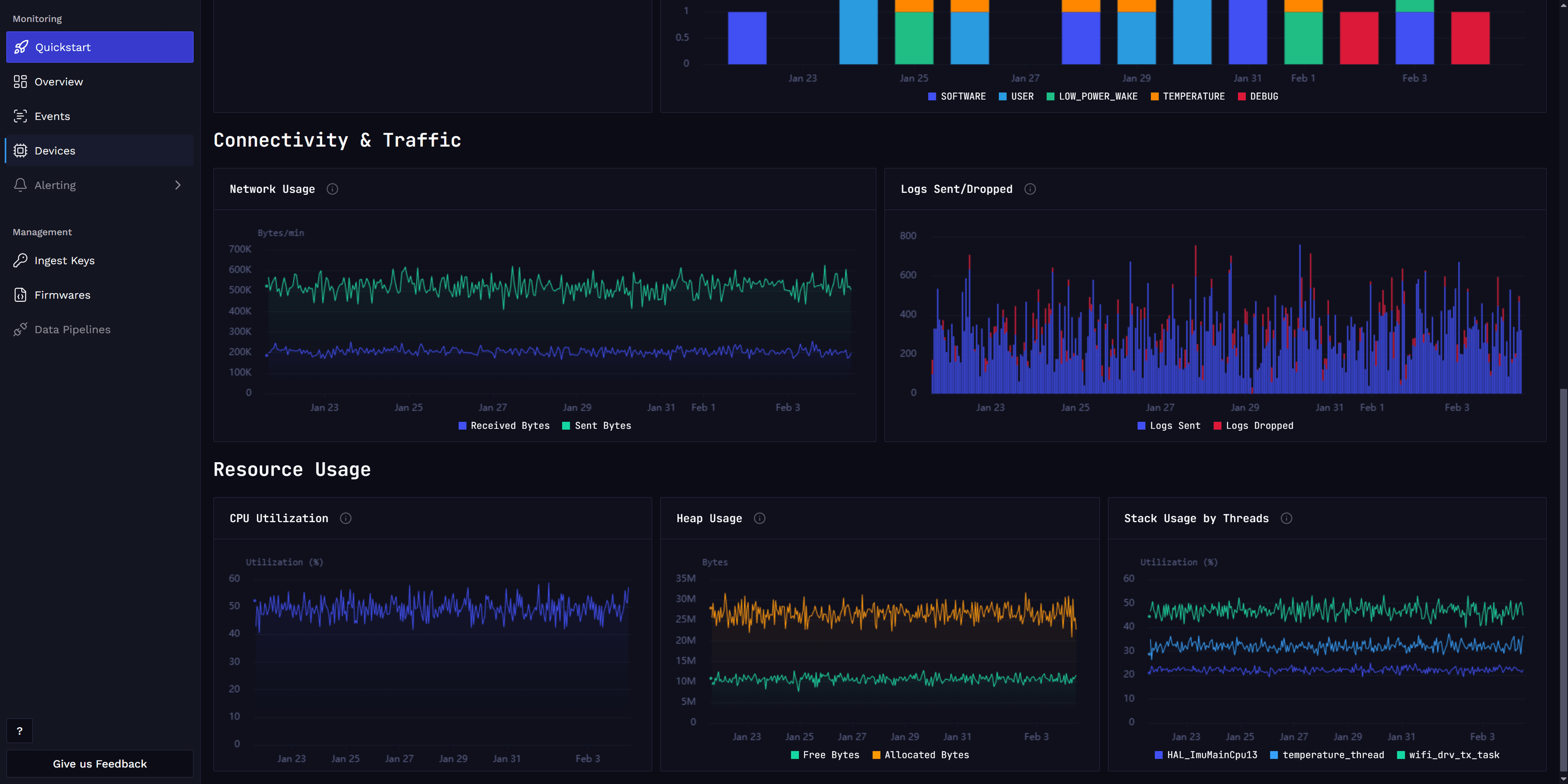
- Operational health monitoring: track CPU, heap, and stack pressure before failures happen.
- Connectivity diagnostics: detect unstable network behavior from TX/RX trends and connection state transitions.
- Stability and reliability analysis: correlate resets with firmware versions, deployment waves, or environmental conditions.
- Capacity planning: understand how close devices run to resource limits over time.
Together, these metrics provide a baseline observability layer even when application-specific metrics are not yet instrumented.
Spotflow supports the following system metrics:
- Heap Free Bytes (
heap_free_bytes) - Heap Allocated Bytes (
heap_allocated_bytes) - CPU Utilization Percent (
cpu_utilization_percent) - Thread Stack Free Bytes (
thread_stack_free_bytes) - Thread Stack Used Percent (
thread_stack_used_percent) - Network TX Bytes (
network_tx_bytes) - Network RX Bytes (
network_rx_bytes) - MQTT Connection State (
connection_mqtt_connected) - Boot Reset Cause (
boot_reset)
Connection state and reset cause are event-based metrics and are reported on events (state change / boot), not by periodic sampling windows.
Uptime Metric (Heartbeat)
In fleet views, uptime trends can help distinguish isolated device instability from broader rollout or infrastructure issues.
Uptime is reported as a dedicated heartbeat metric:
- Uptime Milliseconds (
uptime_ms)
This metric is used in the Device Uptime section of Device Vitals.
Heartbeat is useful as a lightweight liveness signal:
- It confirms that the device is still active and reporting.
- It helps detect silent outages where no logs or other telemetry are produced.
- It provides context for resets by showing uptime progression between reboot events.
Custom Metrics
In addition to built-in system metrics, Spotflow allows you to define and report custom application metrics relevant to your firmware and use case. You can use them to track specific application events, performance indicators, as well as business KPIs.
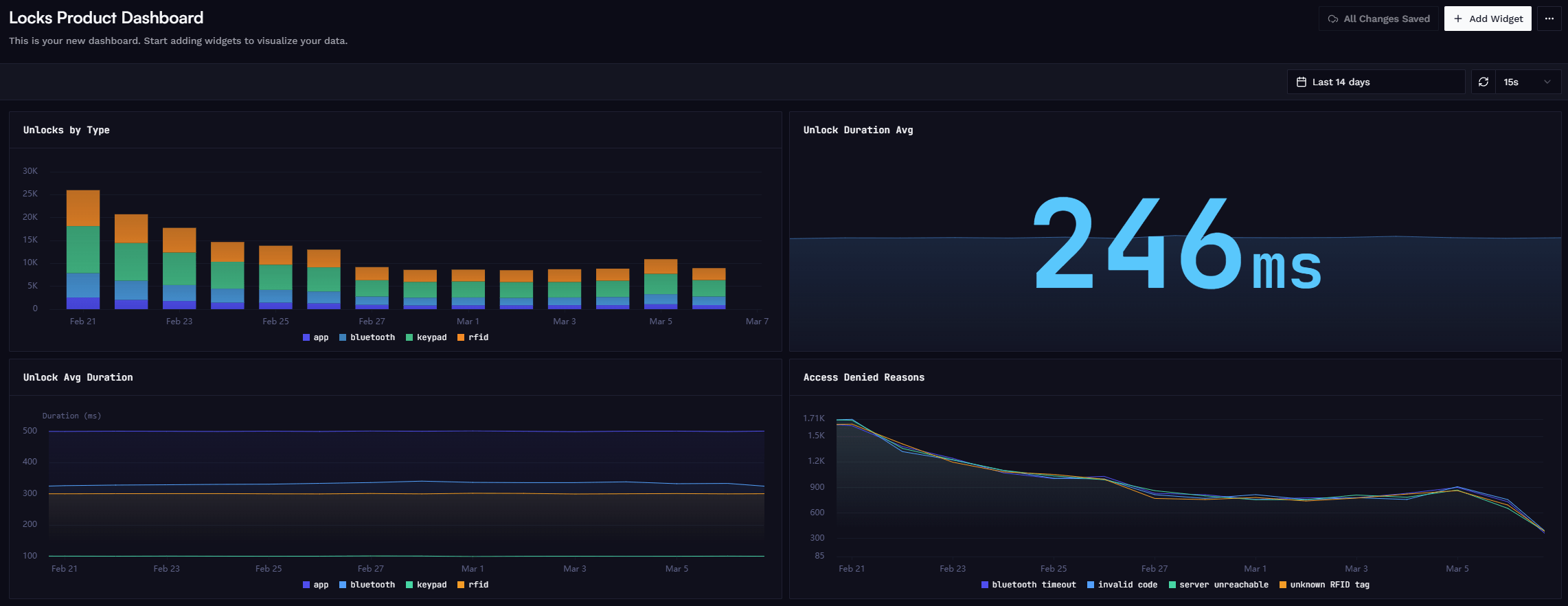
To visualize custom metrics in Spotflow dashboards, you can create custom charts and add them to your device or fleet dashboards. See Dashboards for more details.
Typical use cases include:
- Sensor readings: temperature, humidity, pressure, or other physical measurements.
- Application counters: processed messages, completed tasks, retries.
- Latency tracking: operation duration, response times, with labels for operation type or method.
- Business events: button presses, user interactions, error occurrences.
Custom metrics use the same transport, aggregation, and encoding pipeline as system metrics. The difference is that you register and report them explicitly from your application code, giving you full control over what is measured and when.
To define a custom metric, you need to decide on:
- metricName: a unique identifier for the metric (e.g.,
request_count). - aggregationInterval: the desired aggregation window (e.g., 1 hour).
- labels: optional string key-value pairs to add dimensions to the metric (e.g.,
location: east-14).
Custom metrics support labels for dimensional breakdowns. Each unique combination of label values creates a separate time series with independent aggregation state. For example, a smart lock operation duration metric with operation and method labels tracks each combination (e.g. unlock/nfc, lock/keypad) separately.
When an aggregation window is configured, reported values are accumulated and transmitted as a single aggregated message containing the following statistical values:
- sum: sum of all sample values in the window.
- count: number of samples in the window.
- min: minimum sample value in the window.
- max: maximum sample value in the window.
When using the Spotflow device SDK (e.g. Zephyr or ESP-IDF), these values are computed automatically — you just report raw values and the SDK handles the rest. When using the MQTT integration directly, you construct the aggregated payload yourself. If no aggregation is needed, set the aggregation window to 0 and only the sum field is required (it represents the raw sample value).
System metrics are visualized in the built-in Device Dashboard. Custom metrics can be visualized in Custom Dashboards.
For detailed guides on how to define and report custom metrics, see the Metrics with Zephyr, Metrics with ESP-IDF, and Metrics with MQTT guides.
Product analytics
While technical metrics are essential for monitoring device health and performance, custom application metrics can also be used to track product usage and user behavior. See Dashboards / Product Analytics for more details.
Reference Repository Materials
- Metrics sample (Zephyr)
- Metrics Kconfig options
- System metrics Kconfig options
- Metrics sample (ESP-IDF)
- ESP-IDF metrics Kconfig options
- ESP-IDF system metrics Kconfig options
Learn more
Fundamentals: Dashboards
Guide: Metrics with Zephyr
Guide: Metrics with ESP-IDF
Guide: Metrics with MQTT
How is this guide?