Zephyr on QEMU
No hardware needed. Run real Zephyr firmware on an emulated board with one Docker command, and see its logs, metrics, and an analyzed crash report in Spotflow.
The virtual device is real Zephyr RTOS firmware with the Spotflow device module, running on an emulated Arm Cortex-M3 board in QEMU. It runs in Docker, so you need no development board, no debug probe, and no toolchain. Once the device runs, you see its logs and metrics in Spotflow. Then the device crashes on purpose, and you get a crash report with AI analysis.
Prerequisites
- A Spotflow account. Sign up for free if you don't have one yet.
- Docker. The image runs natively on x86-64 and Arm64 machines, including Apple Silicon Macs.
Start the Virtual Device
Copy an ingest key from the ingest keys page and start the device:
docker run --rm -it -e SPOTFLOW_INGEST_KEY="<your-ingest-key>" ghcr.io/spotflow-io/zephyr-virtual-deviceThe ingest key lets the device authenticate with Spotflow. Docker downloads the image on the first run, then the device boots and connects to Spotflow:
Spotflow virtual device
  Device ID:  virtual-device-vm
  Demo crash: automatically after 60 s, or press 'c'
  Open https://app.spotflow.io to watch logs, metrics and the crash report arrive.
  Stop with Ctrl+C.

*** Booting Zephyr OS build 684c9e8f32e4 ***
[00:00:02.360,000] <inf> main: main: Zephyr virtual device example starting
[00:00:02.360,000] <inf> virtual_device: read_credentials_block: Run-time credentials loaded (device ID: virtual-device-vm, ingest key: provided)
[00:00:03.370,000] <inf> main: main: The demo crash will fire automatically in 60 seconds
[00:00:03.370,000] <inf> sensor_node: sensor_node_step: Sensor reading: 31.0 C
[00:00:04.980,000] <inf> spotflow_net: spotflow_mqtt_establish_mqtt: MQTT connected!
[00:00:05.380,000] <inf> sensor_node: sensor_node_step: Sensor reading: 32.2 C
[00:00:07.390,000] <inf> sensor_node: sensor_node_step: Sensor reading: 29.4 C
...
The device ID comes from the container's hostname, so each docker run adds a new device to Spotflow. To keep the same device across runs, add -e SPOTFLOW_DEVICE_ID=my-virtual-device to the command.
Watch Logs and Metrics
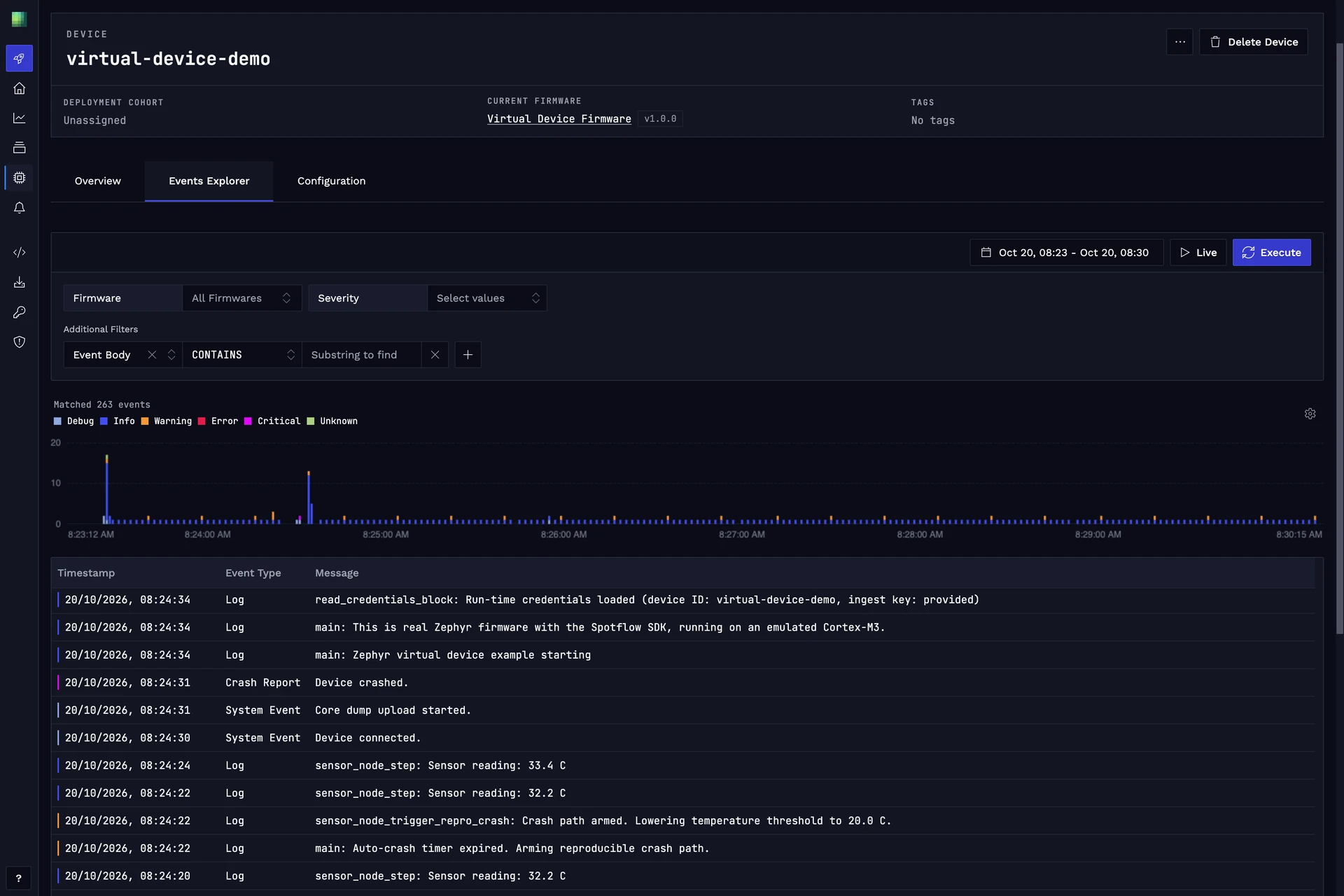
Open the Devices page and select your device. Its logs show every line the firmware logs, including a sensor reading every 2 seconds. Its metrics include the application metrics temperature_celsius and read_errors, and system metrics such as heap usage, CPU utilization, and stack usage per thread.
Let the Device Crash
After 60 seconds, the firmware takes a code path with a bug: it calls an alert callback that was never registered, through a NULL function pointer. The device crashes, Zephyr saves a core dump, and after the restart the device uploads the core dump to Spotflow:
[00:01:05.710,000] <wrn> sensor_node: check_threshold: Temperature threshold exceeded: 28.0 C (threshold: 20.0 C)
[00:01:05.710,000] <err> os: usage_fault: ***** USAGE FAULT *****
...
*** Booting Zephyr OS build 684c9e8f32e4 ***
...
[00:00:03.390,000] <inf> main: main: Device restarted after a reset. A stored core dump is uploaded now.
...
[00:00:08.520,000] <inf> spotflow_coredump: spotflow_poll_and_process_enqueued_coredump_chunks: Coredump successfully sent.
Press c in the terminal to crash the device sooner. To change the delay, add -e SPOTFLOW_CRASH_AFTER=<seconds> to the docker run command. 0 turns the automatic crash off.
Open the Events page and select the crash report from your device. Spotflow already has the core dump and the crash reason, but without the firmware's symbol file it can't decode the stack trace or run the AI analysis yet.
Upload the Firmware's Symbol File
To decode the stack trace, Spotflow needs the firmware's ELF file. Copy it out of the image:
docker run --rm ghcr.io/spotflow-io/zephyr-virtual-device elf > zephyr.elfOn the Firmwares page, select Add New Firmware, name it, for example, Virtual Device Firmware, and select Create Firmware. Select Add New Version, name it v1.0.0, and select Create Firmware Version. Then select Upload Symbol File and upload zephyr.elf.
The device page now shows Virtual Device Firmware v1.0.0 as its current firmware, because the build ID that the device reports matches the symbol file. From now on, Spotflow analyzes each crash report from this firmware as it arrives. If you later pull a newer image, upload its ELF as a new version, because every build has its own build ID.
Crash Again and Analyze
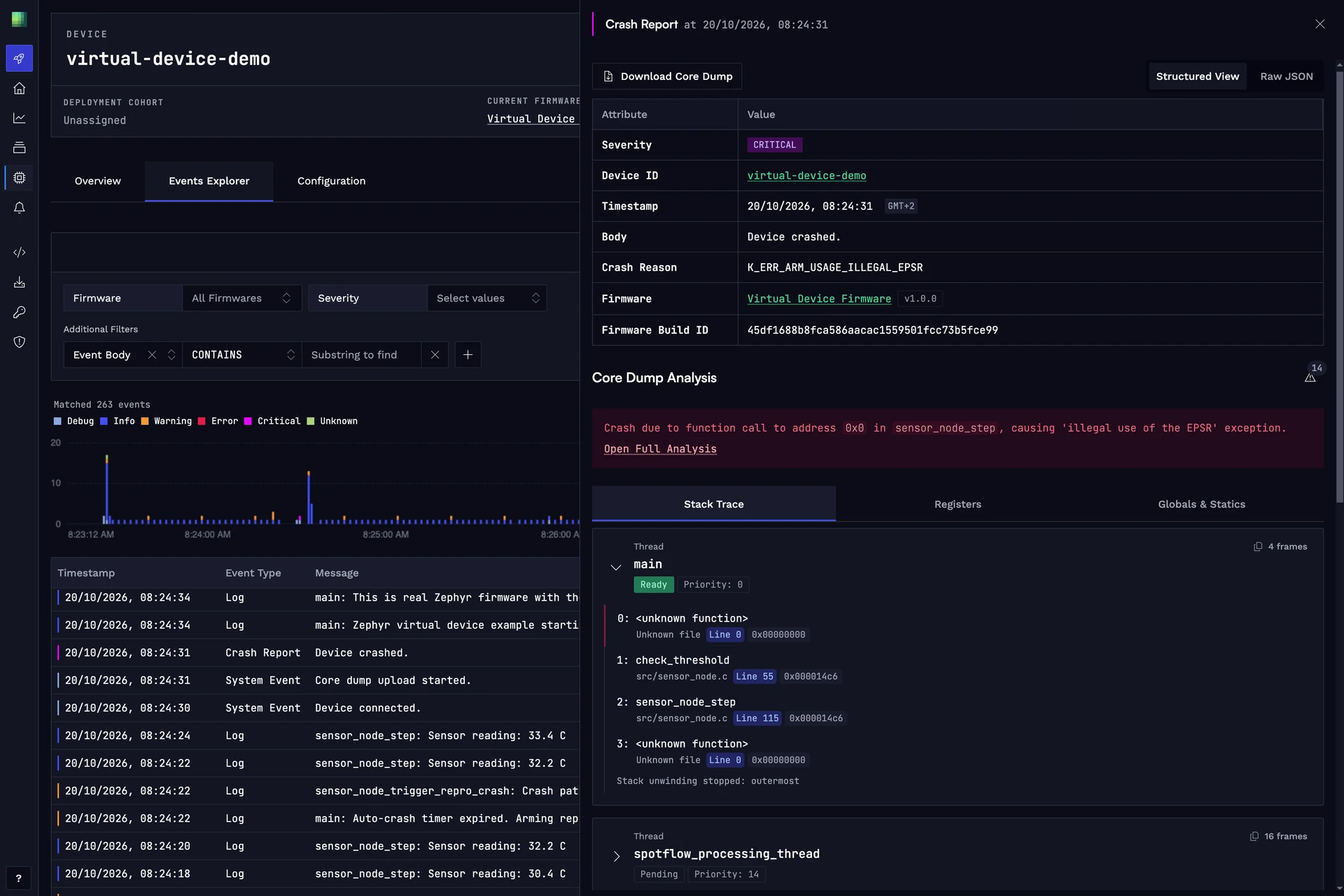
Press c in the terminal. The device crashes again and uploads the new core dump after the restart. Open the Events page and select the new crash report: this time, Spotflow analyzed it with the symbol file.
The stack trace points to check_threshold() in src/sensor_node.c, called from sensor_node_step(), and the AI analysis explains the cause: a call through a NULL function pointer.
In production, upload the symbol file of every build from your CI pipeline, for example with the Management API, so that crash reports from the field are analyzed as they arrive.
What Is Emulated
The firmware is the same code you would flash to a physical board. QEMU emulates an Arm MPS2+ AN385 board with a Cortex-M3 core. Only the network interface, the flash memory, and the way the device receives its ingest key differ from a physical device.
The emulated board has no hardware random number generator, so the firmware uses Zephyr's test random generator, which is not cryptographically secure. Use the virtual device to try Spotflow, not as a reference for production firmware.
Go Further
The virtual device is the zephyr-virtual-device example in our firmware examples repository. Its README shows how to run a fleet of virtual devices with one command, change the firmware and build the image yourself, or build and run the firmware without Docker.
When you're ready to connect a physical board, follow the quickstart for your platform: